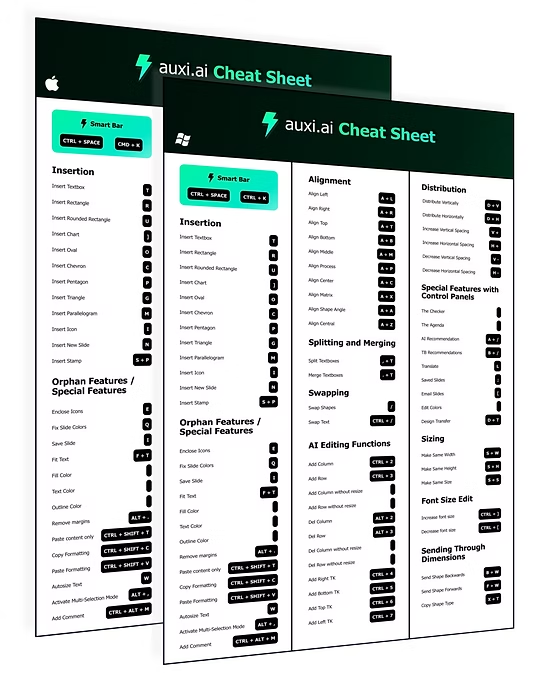
Insertion
Drop in shapes, text and slides without touching the ribbon.
- Insert textboxT
- Insert default textboxD+T
- Insert rectangleR
- Insert rounded rectangleU
- Insert ovalO
- Insert chevronC
- Insert pentagonP
- Insert triangleG
- Insert parallelogramM
- Insert iconI
- Insert new slideN
- Insert stampS+P
- Insert saved slides;
- Insert commentAlt+Ctrl+M
- Insert hyperlinkAlt+Ctrl+K
Alignment
Line everything up in one keystroke.
- Align leftA+L
- Align rightA+R
- Align topA+T
- Align bottomA+B
- Align middleA+M
- Align centerA+C
- Align processA+P
- Align matrixA+X
- Align centralA+Z
- Adjust angleA+A
Distribution & spacing
Even gaps, tighter or looser, instantly.
- Distribute verticallyD+V
- Distribute horizontallyD+H
- Increase vertical spacingV++
- Decrease vertical spacingV+-
- Increase horizontal spacingH++
- Decrease horizontal spacingH+-
Sizing
Match shapes to the first one you select.
- Make same widthS+W
- Make same heightS+H
- Make same sizeS+S
Swap, split & merge
Rearrange content without retyping it.
- Swap shapes/
- Swap textCtrl+/
- Swap multiple shapesCtrl+Shift+/
- Merge textboxes.+T
Tables & key takeaways
Grow tables and add takeaway boxes.
- Add right columnCtrl+2
- Add bottom rowCtrl+3
- Delete right columnAlt+2
- Delete bottom rowAlt+3
- Add right key takeawayCtrl+4
- Add bottom key takeawayCtrl+5
- Add top key takeawayCtrl+6
- Add left key takeawayCtrl+7
Formatting & fonts
Copy styles and resize text across shapes.
- Copy formattingCtrl+Shift+C
- Paste formattingCtrl+Shift+V
- Paste content onlyCtrl+Shift+T
- Increase font sizeCtrl+]
- Decrease font sizeCtrl+[
- Autofit shapeAlt+Ctrl+S
- Autofit textAlt+Ctrl+T
- Remove marginsAlt+.
- Remove highlight textAlt+/
Layers & grouping
Control what sits on top.
- Bring forwardCtrl+Shift+[
- Send backwardCtrl+Shift+]
- Bring to frontCtrl+.
- Send to backCtrl+,
- Group shapesCtrl+G
- Copy shape typeX+T
Power features
Panels for the bigger jobs.
- AI recommendationsA+I
- Type-based recommendationsB+I
- Translate presentationL
- Email slides[
- Save slide\
- Fix slide colorsQ
- Enclose iconsE
- Multi-selection modeAlt+,
- auxi smart mappingCtrl+1
No shortcut matches that search. Try the Smart Bar inside PowerPoint.