
See auxi in action
your workflows and save you time!
You've just restructured a 30-slide strategy deck. Three sections moved, one got cut, and a new one got added at the front. The content is finally right. Then you remember: the agenda slide. It still lists the old order, the old page numbers, and a section that no longer exists. So, you go back to slide 2 and start manually retyping, renumbering, and re-linking, hoping you don't miss one.
The agenda is the least glamorous slide in any consulting or banking deck and one of the most quietly expensive. Not because building it once is hard, but because you rebuild it every time the deck changes. And the deck always changes.
This post walks through the same task done two ways, by hand and with auxi's Agenda Maker.
Why the Agenda Slide Costs More Than You Think
The trap with agenda slides is that the first build feels cheap. Ten minutes, maybe less. What people forget to count is everything after the first build.
Every time you reorder sections, the numbering breaks. Every time you insert a slide, the page references drift. Every time a section title changes, the agenda and the deck quietly disagree. On a deck that goes through five or six rounds of revision before it ships, that ten-minute build becomes a recurring tax you pay on every round. And because it's the second slide the client sees, an agenda that doesn't match the deck reads as carelessness before you've made your first real point.
The manual cost isn't the build. It's the maintenance.
The Task: A 30-Slide Deck with a Linked, Numbered Agenda
Here's the scenario for the comparison. A strategy deck with six sections. The agenda needs to be numbered, visually consistent with the deck, and ideally linked so the reader or presenter can jump to a section. Then, partway through, the deck gets restructured, two sections swap order, and one new section is added, and the agenda has to stay correct.
Building It from Scratch
- Create the agenda slide. Lay out a text box or table, type each section title, add numbering, and format to match the deck. Roughly 5 to 10 minutes.
- Add section links manually. Hyperlink each agenda item to its section slide, one at a time. Another 5 to 10 minutes, longer if you're also building section divider slides.
- Check page numbers and alignment. Confirm every reference point to the right slide and everything lines up. A few more minutes.
- Then the deck changes. Reorder two sections, add one. Now renumber, re-link, and re-verify by hand. Realistically another 5 to 10 minutes, and this is the step where errors slip in, because you're doing it under time pressure and it's tedious enough that attention drifts.
Illustrative total: roughly 15 to 30 minutes across the initial build and one round of revision, with real risk of a stale link or wrong number surviving to the client.
Building It With auxi's Agenda Maker
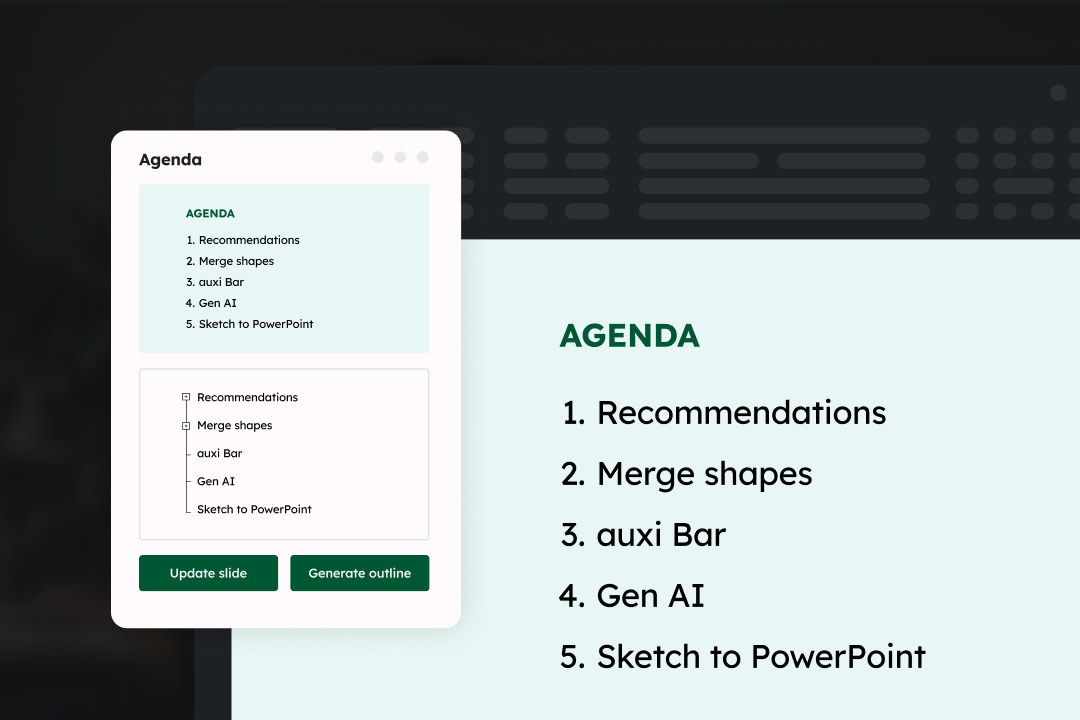
- Open the Agenda Maker from the auxi Smart Bar and generate the agenda outline. The chapters and sections are pulled into a single panel, numbered and linked to their slides automatically.
- Arrange with drag and drop. Reorder chapters and sections directly in the panel without opening individual slides or breaking your formatting.
- The deck changes? Update on the panel. Because the agenda items stay linked to their sections, reordering and adding section updates in the Agenda Maker rather than forcing a manual rebuild on slide 2. Numbering and links stay consistent.
- Reuse next time. Save the agenda settings by client or for internal alignment, so the next deck starts from your finalized format instead of a blank slide.
The single biggest difference isn't the first build. It's what happens on revision four at 10 PM. Building from scratch, every structural change reopens the whole manual loop. With the Agenda Maker, the agenda is linked to the deck's structure, so the deck and the agenda stay in agreement instead of drifting apart.
The Part That Doesn't Show Up in the Timer
Time saved is the obvious win. The quieter one is consistency. A hand-built agenda is only as accurate as the last person who remembered to update it. A linked agenda that stays tied to the deck's actual sections removes the specific failure that embarrasses people most: an agenda that confidently lists the wrong thing to the client. For teams standardizing how decks get built, saved agenda settings also mean the same structure and styling carry across projects instead of being reinvented each time. That's the same logic behind keeping a whole deck on brand automatically rather than fixing it slide by slide.
See the Agenda Maker build and update a linked agenda in seconds. Request a demo.
At auxi, we didn't stop at the first version. The Agenda Maker itself keeps getting sharper. The clip below compares the older Agenda Maker with the latest one, so you can see how much faster and cleaner the updated build has become.