
See auxi in action
your workflows and save you time!
It's 11:47 PM. The client wants the deck by midnight. You've been staring at these slides for so long that your eyes skate right over them. You hit send. Twelve minutes later, the reply lands: "Slide 14 still says [CLIENT NAME]. And the logo on the cover is wrong."
Every consultant and banker has a version of this story. The work was right. The finish was wrong. And the gap between the two is almost always a handful of small, boring, catchable things that nobody had five clean minutes to check.
Below is a checklist you can use to review any deck before you hit send, built around the three issues most likely to undermine your work: content that should not be there, formatting that looks careless, and brand inconsistencies that erode trust.
Each item outlines what to check, and highlights where an auxi function can turn a time-consuming manual review into a single click.
At minimum, three things you should always check: remove all confidential and internal content (comments, notes, hidden slides, placeholder text), catch text errors (duplicate words, double spaces), and confirm no empty placeholders remain. Beyond that, verify brand compliance, alignment, agenda accuracy, and do one final full screen read.
Why the Last Five Minutes Matter
A client does not see the eight hours you spent building the model behind slide 9. They see the typo in the title. They see the second version of the logo on page 15. They see the internal comment you forgot to delete that says, "is this number even right?"
Small errors read as large ones because they're the only part of your process the client can actually inspect. A stray comment doesn't just look sloppy. It makes the reader quietly wonder what else you didn't check. That's the real cost of a missed pre-send sweep: not the typo itself, but the doubt it plants about everything around it.
The challenge is that a manual final review can make it easy to overlook small details. You're tired, you're rushed, and you've read these slides so many times your brain autocorrects the errors before you can see them. The checklist exists to catch what your eyes no longer can.
The Pre-Send Checklist
Run these in order. The first three are the "do not ship" items. The last four are the polish.
1. Kill Every Piece of Confidential and Internal Content
What to check: Speaker notes, leftover comments, internal markup, hidden slides, placeholder text like "[CLIENT NAME]", and anything that says what you actually think rather than what you're presenting. A comment reading "push back if they question this" going to the client is not a formatting error; it's a relationship problem.
The auxi way: The Checker scans the entire deck and surfaces stray comments, notes, and other workspace items in one pass, then lets you remove all internal or confidential information before you ship, whether the deck is 5 slides or 500.
2. Catch the Text Errors Your Eyes Skate Over
What to check: Duplicate words ("the the"), double spaces, and the small typographic slips that survive a dozen read-throughs precisely because they're so small.
The auxi way: The Checker flags every duplicate word and double space, tells you exactly how many instances exist, and lets you fix them one by one or all at once. This is the classic case of a task a machine does perfectly, and a tired human does badly.
3. Confirm Placeholder and Empty Elements Are Gone
What to check: Empty text boxes, unfilled placeholders, and the "insert title here" ghosts that hide behind other objects or sit on a slide you thought you finished.
The auxi way: The Checker identifies empty placeholders and out-of-work zone elements across the deck, including the ones sitting just off the visible slide where you'd never catch them by scrolling.
4. Check Brand Compliance in One Pass
What to check: Fonts that drifted to a system default, colors that are "close enough" but off by a few hex values, and logo versions that don't match the current brand.
The auxi way: You can load your brand guidelines directly into the Checker, so it flags anything off-profile, and branding automation can transform the whole deck to your brand in one click. For a deeper pre-audit on brand drift specifically, the brand audit checklist goes element by element.
5. Verify Alignment and Spacing on Key Slides
What to check: Objects that are a few pixels off, inconsistent gaps between elements, and the subtle misalignments that make a slide feel amateur even when the reader can't name why.
The auxi way: Smart Alignment fixes spacing and alignment across selected objects instantly instead of nudging each one by hand.
6. Sanity-Check the Agenda and Section Links
What to check: That your agenda matches the actual sections in the deck, that page references are correct, and that nothing has shifted after a late slide insertion.
The auxi way: The Agenda Maker keeps agenda items linked to their sections, so a late structural change updates the agenda instead of silently breaking it.
7. Do the Final Full-Screen Read
What to check: One pass in presentation mode, start to finish. This is the only item on the list a tool can't do for you, and it's worth it. You're looking for the things a checklist can't define: a chart that doesn't say what you meant, a title that lands wrong, a slide that feels off.
Manual Sweep vs. Running It With auxi
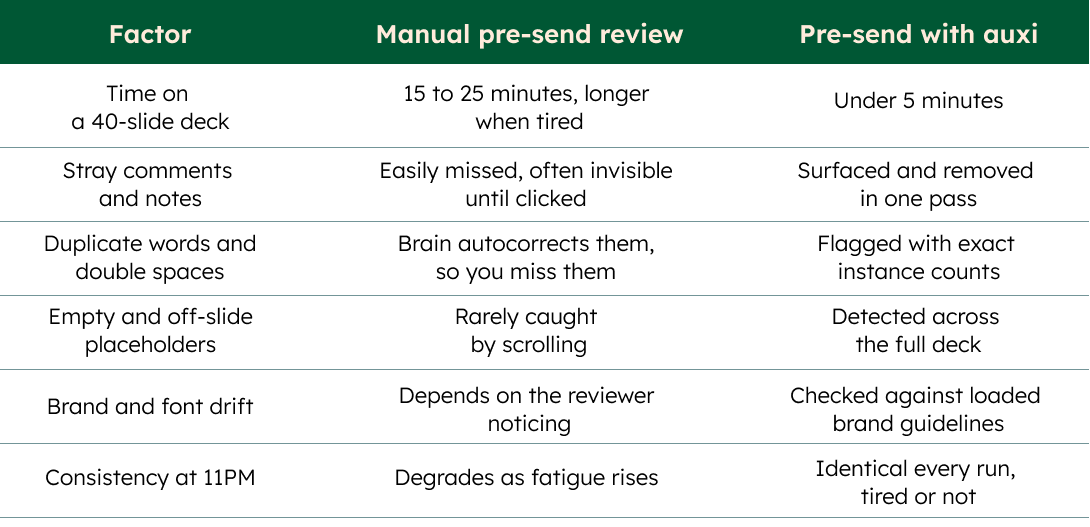
The point isn't that a tool replaces judgment. The point is that items 1 through 6 are pattern-matching against known error types, which is exactly the work fatigue destroys, and automation runs the same way every time.
Run your pre-send sweep in one pass. See auxi's Checker in action.
Deck hygiene is one piece of a healthy PowerPoint workflow. This is a general productivity guide, not formal guidance for any specific firm's compliance or confidentiality obligations, which you should confirm against your own firm's policies.